
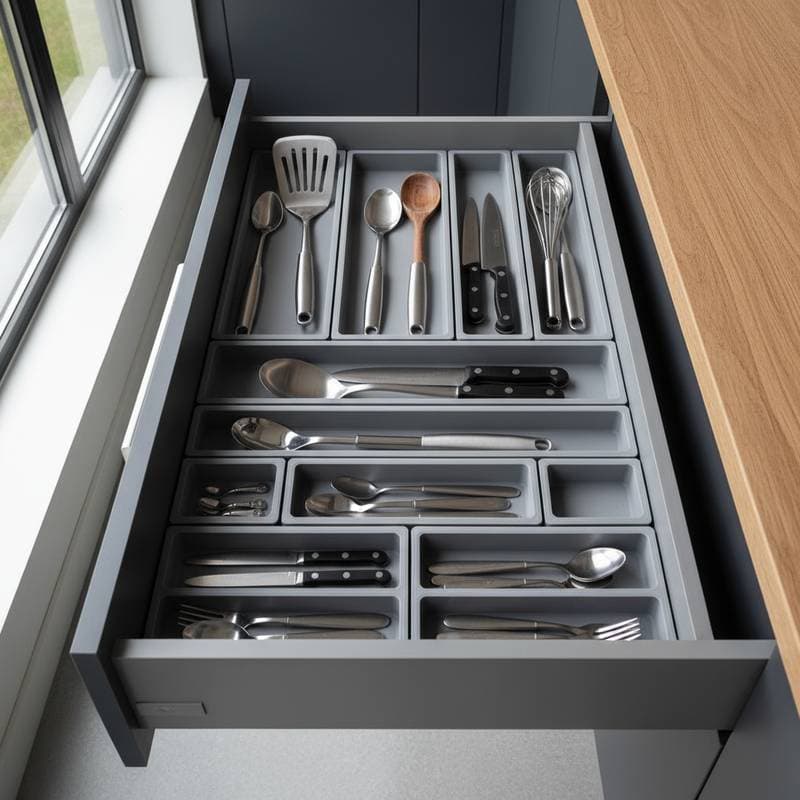
Custom 3D-Printed Drawer Inserts: Organize Chaos for Under $25
Drawers often appear tidy immediately after a cleanup session, yet disorder reemerges within weeks. Traditional dividers require extensive measuring, cutting, and adjustment, while off-the-shelf trays seldom align with unique drawer dimensions. 3D-printed inserts address these challenges through precise customization, enabling the creation of organizers that accommodate specific utensils, tools, or hardware while maintaining an efficient and orderly workspace.
The Advantages of 3D-Printed Inserts for Drawer Organization
A 3D printer builds inserts layer by layer from a digital design, ensuring exact replication of measurements. This method accommodates drawers of varying shapes, including those with curved edges or irregular widths. Begin by scanning or manually measuring the drawer interior, then use software to design compartments suited to items such as knives, screwdrivers, or cooking utensils.
These inserts resolve essential organization issues:
- Elimination of wasted space: Unlike generic trays, custom designs maximize every inch.
- Prevention of item movement: Secure fits keep contents stable when drawers open and close.
- Simplified maintenance: Seamless compartments reduce gaps where dirt accumulates, easing cleaning routines.
Common materials include PLA for its affordability and suitability in low-stress applications, and PETG for enhanced durability against moisture and elevated temperatures, which proves beneficial in kitchen or garage settings. A standard spool of filament, costing approximately $25, yields inserts for multiple drawers, typically four to six depending on size.
After printing, the inserts install with a secure fit that prevents sliding or rattling. Many designs incorporate modular components that interlock, allowing users to reconfigure compartments as storage needs evolve over time.
Getting Started with Design and Printing
To initiate the process, measure the drawer's interior dimensions in millimeters, accounting for any protrusions from hardware or uneven corners. Free tools such as Tinkercad provide an accessible entry point for beginners, while Fusion 360 offers advanced features for complex layouts. Import measurements into the software to generate a foundational grid, then add dividers tailored to item sizes. For instance, allocate slots of 20 mm by 150 mm for standard screwdrivers or 10 mm deep trays for small fasteners.
Test the digital model with a virtual fit simulation before printing to avoid material waste. Print settings should include a layer height of 0.2 mm for smooth surfaces and infill density of 20 percent for lightweight yet sturdy results. The entire process, from design to completion, often takes under two hours per insert.
Budget Considerations and Cost Management
The investment for a single drawer insert ranges from $25 to $80, influenced by design intricacy and material selection. Owners of 3D printers incur primarily filament costs, whereas outsourcing to online printing services incurs an additional $20 per piece but eliminates equipment needs.
Strategies to Minimize Expenses
- Fabricate only the primary base structure and integrate dividers from affordable materials like thin plywood or acrylic sheets, cut to size with basic tools.
- Arrange designs for multiple drawers on a single print bed to optimize filament usage and reduce supports.
- Purchase filament in larger quantities, which lowers the cost per drawer by up to 30 percent through bulk pricing.
Precision in measurements remains crucial; a discrepancy of even 1 mm may lead to instability or operational noise during use. Allocate time for post-print finishing, such as sanding edges, to ensure a professional appearance and functionality.
Pitfalls to Sidestep in the Printing Process
Novices frequently overlook printer calibration, resulting in components that prove too small for intended spaces. Always verify bed leveling and extrusion rates prior to starting a project.
Account for clearance by incorporating an additional 0.5 mm on each side of the design, facilitating smooth insertion and removal. Overly elaborate layouts with numerous tiny compartments complicate cleaning and increase print failure risks due to intricate supports.
Select materials wisely; brittle options like basic PLA may crack under repeated handling, whereas PETG withstands environmental stresses in demanding areas. Conduct a small test print to evaluate material performance in your specific application.
Personalizing Inserts for Optimal Use
With inserts in place, enhance functionality through labeling compartments for quick identification or applying color coding to categorize items by function, such as tools versus supplies. In workshop environments, incorporate textured grips on surfaces to secure heavier items like pliers or hammers.
For kitchen applications, design rounded edges to safeguard delicate utensils from scratches. Advanced users might embed magnets into prints for holding metal tools or integrate drainage channels in food prep areas to manage spills.
Experiment with hybrid designs, combining printed bases with fabric liners for softer storage of fragile items. These adaptations ensure the system aligns precisely with daily routines.
Achieving Lasting Organization Benefits
3D-printed inserts deliver unmatched precision and adaptability to routine storage challenges. They convert disorganized drawers into streamlined systems that enhance productivity and reduce frustration. By investing minimal time and resources, users gain customized solutions that evolve with changing needs, fostering a more controlled and inspiring environment in any space.