
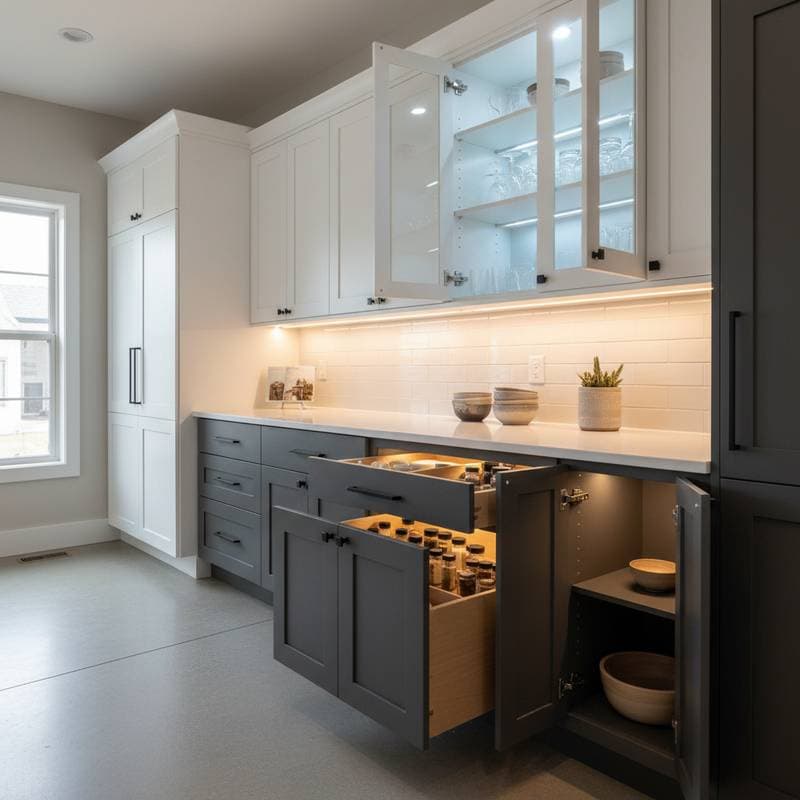
Revolutionize Your DIY Cabinets with Smart LED Lighting
A dark cabinet conceals more than mere clutter. It obscures the craftsmanship invested in every joint and finish. For those who construct cabinets from raw materials or revitalize older units, proper lighting transforms the entire experience. Contemporary smart LED systems begin at $25 per cabinet for simple motion-activated strips and extend to $150 per cabinet for comprehensive kits that integrate with mobile devices. Such installations accentuate the precision of joinery, streamline access to stored items, and impart a professional aesthetic comparable to high-end workshops.
Understanding Smart LED Cabinet Lighting
Smart LED cabinet lighting merges low-voltage LED strips or puck-style fixtures with wireless controls and integrated sensors. These setups consume minimal power, drawing between 4 and 12 watts per fixture, while offering lifespans of 25,000 to 50,000 hours prior to any need for replacement.
The intelligence of these systems stems from features like motion detection, adjustable dimming, and connectivity via Bluetooth or Wi-Fi. Users gain the ability to modify brightness levels remotely through a smartphone application or configure automatic activation upon opening a drawer or door. This creates an environment that responds intuitively to daily routines, fostering a sense of personalization in the workspace.
LED technology proves ideal for wooden cabinetry due to its low heat output, which prevents warping or discoloration. The slim profile of strips and pucks allows seamless integration beneath shelves, within toe kicks, or along vertical panels, eliminating the need for obtrusive mounting hardware. Advanced controls not only minimize energy consumption but also prolong the operational life of individual diodes through optimized usage patterns.
To begin implementation, select a single cabinet for initial testing. Evaluate the positioning of lights, desired brightness levels, and the reliability of sensor activation. This preliminary step identifies potential adjustments before expanding to a complete workshop or kitchen array.
Costs and Budget Considerations
A full smart LED installation for a standard kitchen or workshop cabinetry setup typically falls within the $300 to $900 range, depending on scale and features.
Several elements influence the overall expenditure:
- Fixture Types: Flexible LED strips offer affordability compared to rigid aluminum bar lights, with strips starting at $10 per meter.
- Control Components: Motion sensors alone cost under $20, whereas hubs enabling app-based management range from $60 to $120.
- Power Sources: A reliable 60-watt driver averages $25, sufficient for powering multiple fixtures.
- Supplementary Items: Connectors, light-diffusing covers, and adhesive mounting clips contribute an additional $30 to $80.
To optimize expenses without sacrificing quality, opt for pre-packaged kits featuring custom-cut lengths and self-adhesive backing, which minimize material waste. Select warm white LEDs rated at approximately 3000K to complement the natural hues of wood finishes, enhancing visual warmth. Where feasible, employ a single centralized driver to serve several cabinets, reducing redundancy and costs.
Prioritize components certified by UL standards and select appropriate wire gauges to uphold safety protocols and meet building codes. Such diligence prevents hazards and ensures long-term reliability.
Installation Layouts and Techniques
Effective planning of light placement maximizes both utility and aesthetics. For under-cabinet applications, position strips along the front edge of shelves to cast even illumination over countertops or workbenches. In vertical cabinet doors, integrate slim pucks at mid-height to highlight contents without creating shadows.
Consider the cabinet's dimensions and usage patterns when designing the layout. A workshop cabinet storing tools benefits from focused beams on specific drawers, while kitchen units require broader coverage for ingredient visibility. Integrate sensors near hinges or handles to ensure prompt activation, and incorporate dimmers for tasks ranging from detailed assembly to general overview.
During installation, secure fixtures with provided adhesives or clips, routing wires along inconspicuous paths such as cabinet backs or sides. Test the entire circuit for consistent performance, adjusting angles to eliminate glare or dark spots. Professional assistance proves valuable for complex wiring, particularly in larger setups involving multiple power zones.
Common Mistakes to Avoid
-
Overloading Power Supplies: Exceeding a driver's rated wattage accelerates component failure. Calculate total load in advance and distribute fixtures across multiple drivers if necessary.
-
Overlooking Ventilation Needs: Despite their efficiency, LEDs generate some heat. Ensure airflow around fixtures by avoiding enclosure within fully sealed compartments.
-
Selecting Inappropriate Color Temperatures: A cool white setting at 5000K often renders warm wood tones stark and uninviting. Sample various options in the actual environment prior to commitment.
-
Inadequate Wire Organization: Unsecured cables create visual clutter and pose risks of damage from frequent cabinet access. Employ cable clips or dedicated routing channels for a tidy finish.
-
Suboptimal Sensor Positioning: Placement behind moving parts like hinges obstructs detection. Mount sensors in clear lines of sight to doors or drawers for dependable operation.
Address these issues through a thorough mock installation using temporary mounts. This approach reveals flaws early, saving time and resources on permanent fixes.
Maintaining and Enhancing Your Smart LED System
After installation, the smart LED setup elevates daily interactions within the space. Program schedules to illuminate areas during morning preparations, or apply dimming for relaxed evening sessions. Motion sensors conserve energy by deactivating lights in unoccupied zones, while app integrations allow real-time monitoring of usage patterns.
Routine maintenance sustains peak performance. Wipe fixtures gently to remove dust accumulation, which can diminish light output over time. Reapply adhesive mounts periodically if adhesion weakens, and monitor app notifications for firmware updates that refine connectivity or efficiency.
Over time, these systems contribute to increased property appeal, as prospective buyers appreciate the seamless blend of smart technology with custom woodwork. Experiment with color-changing options for seasonal adaptations, further personalizing the environment to evolving needs.