
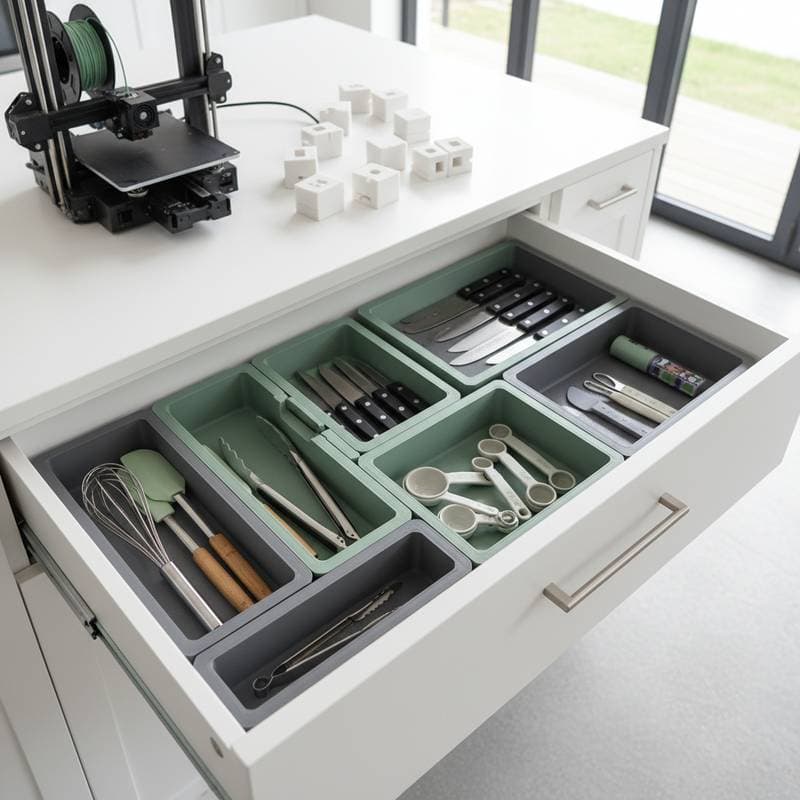
The Mainstream Rise of 3D-Printed Drawer Organizers
The quiet revolution in home organization takes place on desktops and workbenches, where 3D printers hum through the night. Drawer organizers, once confined to fixed plastic trays or labor-intensive custom inserts, now emerge precisely tailored to every nook of a homeowner's space. This evolution brings unmatched precision at a fraction of the cost, while slashing material waste.
This approach merges digital design with everyday storage demands. It redefines the way woodworkers, hobbyists, and homeowners manage their drawers.
What Sparked the Shift
For decades, drawer organization required compromises. Off-the-shelf trays came cheap but fit poorly. Custom wooden inserts delivered superior aesthetics, yet they demanded hours of cutting, sanding, and specialized tools. Affordable 3D printing closes this divide.
Designers and enthusiasts exchange open-source templates, easily tweaked in free software like Tinkercad. A kitchen drawer that previously swallowed utensils in disarray now holds them in exact compartments. The concept extends to workshop drawers, craft stations, or bathroom cabinets.
"People want order that feels intentional," said interior designer Mara Linton, who partnered with a local maker to streamline a client's studio. "3D printing lets you match the insert to what you own, not the other way around."
How 3D Printing Fits into Modern Storage Habits
Digital fabrication meets the growing call for intelligent storage. Homeowners modify organizers as their tools or supplies change, instead of bending to inflexible store-bought options. A single design file resizes, reprints, or rearranges to suit shifting needs.
Start with precise measurements. Chart the drawer's inner dimensions, catalog the items inside, and outline compartment layouts. CAD tools like Fusion 360 allow adjustments down to the millimeter. Printing durations vary: a few hours for simple dividers, up to a full day for expansive modular trays.
The result is a seamless grid that hugs the drawer walls, banishing empty spaces and rattling components. Common materials encompass standard PLA for basics, robust PETG for durability, and recycled filaments for demanding applications.
At a Glance
Who uses them: Homeowners, woodworkers, professional organizers
Typical sizes: From 10 inches by 12 inches (25 by 30 centimeters) to full-scale kitchen or workshop drawers reaching 36 inches (91 centimeters) wide
Design software: Fusion 360, Tinkercad, or open-source slicers
Printer types: Desktop FDM models with build plates starting at 8 inches (20 centimeters) square
Materials: PLA, PETG, wood-filled filament, recycled blends
Designer insight: "Every millimeter matters, but so does the texture," said maker and designer Juan Ochoa. "A matte surface hides fingerprints and looks more integrated with wood cabinets."
Before: The Drawer Dilemma
Before digital tools arrived, drawers brimmed with mismatched trays and makeshift dividers. Plastic bins slid around during pulls, and wooden inserts necessitated fresh cuts and finishes for any tweak.
Workshop drawers for screws, drill bits, and small tools quickly devolved into chaos. Kitchen utensils piled in corners. Homeowners faced a choice: stock up on suboptimal organizers or resign to perpetual clutter.
Bespoke cabinetry offered a premium alternative, but its expense and installation demands sidelined it for renters and those in tight quarters.
After: Custom Fit with Minimal Waste
3D printing sparks instant change. Organizers nestle tightly into drawers, often accurate to one-sixteenth of an inch (1.5 millimeters). Compartments replicate the exact profiles of stored items.
Images of completed projects showcase trays with curved edges, subdued matte surfaces, and interlocking modular slots. These designs ensure visual harmony across drawers for a cohesive look.
Integrated lighting boosts usability. Incorporate under-cabinet LED strips or drawer-affixed fixtures. The glow outlines sections, easing the grab of tiny items.
The team at Studio Keene calls it "precision calm." In one compact apartment kitchen, they used 3D-printed dividers in warm gray filament to echo matte oak cabinets. The homeowner observed, "I open the drawer and know exactly where everything sits. It feels peaceful."
Design Details
- Layout flexibility: Modular components shift as requirements change.
- Material variety: Eco-friendly PLA works for light tasks; PETG withstands heavier loads like tools or hardware.
- Finish options: Layered textures mimic brushed metal; sleek matte tones merge with wood surfaces.
- Color coding: Designate hues for categories, such as blue for utensils, gray for tools, white for craft supplies.
- Smart features: Embed QR codes on bases for app-based inventory tracking.
- Sustainability: Reusable digital files cut scrap; recycled filaments reduce ecological footprint.
These features streamline daily tasks. Locate a screwdriver, measuring spoon, or paintbrush from its spot without rummaging.
Why It Matters for Woodworkers
Woodworkers gain shop discipline through 3D-printed organizers. Drill bits, router templates, and chisels slot into bespoke pockets. Print inserts overnight to skip foam carving or mini wooden tray assembly.
A hybrid technique rises in favor. Install 3D-printed pieces inside wooden drawers, blending wood's natural appeal with plastic's adaptability. Wood-infused filaments produce faint grain patterns that complement workshop styles.
"Woodworkers appreciate accuracy," said product designer Carla Nunez. "When you can make a holder that fits a specific chisel handle within a fraction of a millimeter, it changes how you work."
The Broader Trend: Customization as Standard
3D-printed drawer organizers signal a pivot to personalization. Homeowners demand storage that syncs with their habits, emphasizing flexibility and precision.
Retailers respond in kind. Cabinet makers supply downloadable STL files for inserts that match their drawer lines. Some team up with nearby makers for custom printing services.
This reaches everyone. Renters in modest kitchens craft inserts for less than one commercial unit. DIY fans tweak sections for expanding tool sets without overhauls.
Practical Ways to Try It at Home
Begin small to bring this into your setup.
- Measure accurately. Record inner dimensions in inches and millimeters. Note corner curves or hardware bumps.
- Sketch your layout. Cluster items by size and access frequency. Place daily essentials upfront.
- Download or design. Grab free templates online or modify open-source files.
- Choose filament wisely. Pick food-safe PETG for kitchens. Go with sturdy PLA or composites for shops.
- Print a test section. Output one compact module to confirm alignment before a complete run.
- Finish details. Smooth edges with sandpaper for safe handling. Add felt pads underneath to mute slides.
Once in place, order becomes second nature. Drawers stay serene, and finding items demands little thought.
Key Takeaways
- 3D printing turns drawer organization from static to versatile.
- Tailored inserts boost function, trim waste, and refine style.
- Modular setups benefit homes and pro workshops equally.
- Material and texture choices guarantee cabinetry harmony.
- Digital files enable iterations without extra materials.
Building on This Technology
With desktop printers spreading, lines blur between furniture and add-ons. Designers craft hybrids of printed modules and wood frames.
Next-generation printers blend filaments for soft borders around fragile goods and firm centers for robust tools. Lighting evolves too, with LED paths built into divider structures.