
3D Jigs That Speed Up Cabinet Builds Dramatically
Custom cabinetry demands precision, but repetitive tasks consume valuable time. Traditional jigs assist with these processes, yet they often require extensive setup, adjustments, and precise replication. The emergence of 3D printed jigs alters this approach fundamentally. Woodworkers now create purpose-built guides for drilling, cutting, and assembly that align exactly with specific cabinet dimensions. These tools deliver faster production cycles, superior tolerances, and reduced errors in operations such as shelf pin installation or hinge placement.
At a Glance
Who uses them: Small cabinet shops, DIY woodworkers, and custom builders
Location: Home workshops and production facilities
Size range: From compact 150-square-foot garages to expansive production floors
Design teams: Shop owners employing CAD software like Fusion 360 or SketchUp, along with slicers such as PrusaSlicer or Cura
Photographer: Studio images captured by shop teams
Before
Cabinet fabrication typically involves managing numerous templates. Builders store MDF jigs along walls, labeled for various cabinet lines. These wooden aids warp or degrade over time, leading to inaccuracies. Measuring, marking, and drilling each panel demands hours per unit. Small misalignments accumulate during assembly, necessitating additional sanding or filler applications.
"Once you start repeating a cabinet style, you realize how much time you lose rechecking the same hole spacing," said cabinetmaker Luis Ortega. "I wanted a jig that would never drift, even after a hundred uses."
After
Ortega prints his jigs overnight using PLA or PETG filament. He designs guides that secure over panel edges, incorporating built-in bushings for drill bits. These jigs lock firmly, ensuring alignment with dowel or shelf-pin patterns. This method reduces his build time per cabinet by nearly thirty percent.
In numerous shops, 3D printed jigs serve as reliable aids. They maintain face frames square, direct hinge cup installations, and mark drawer fronts with unwavering consistency. Designers value the ease of updating digital files for new cabinet lines, printing revised jigs, and sustaining production momentum.
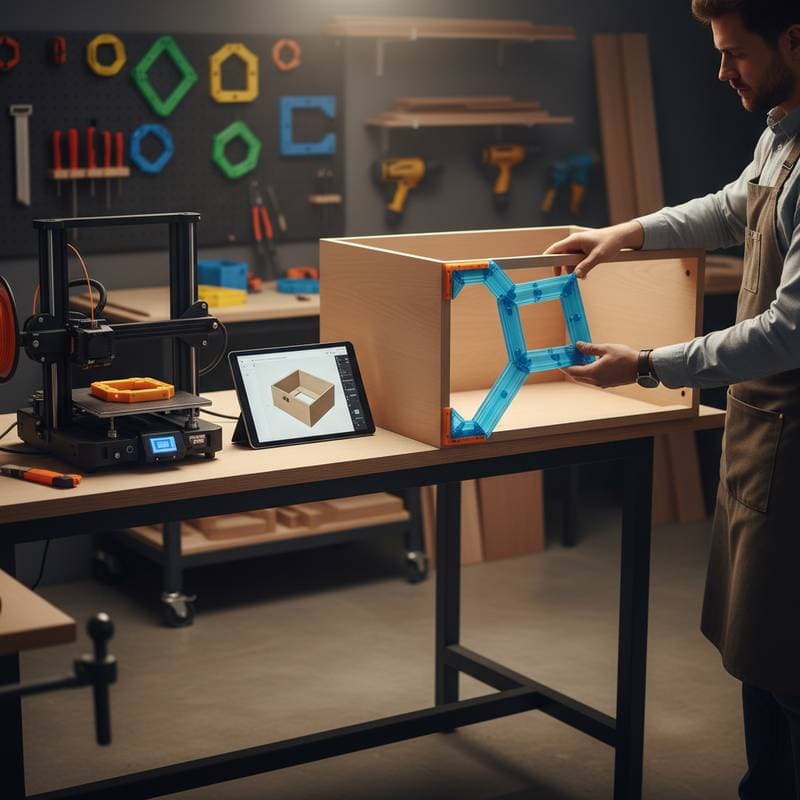
Photographs depict a set of bright orange jigs attached to a birch plywood side panel. Corner guides fix the drilling angle, while linear spacers ensure uniform shelf heights. The images highlight the precision of 3D layer lines, sharp and uniform throughout the print.
Design Details
- Material: PLA for rapid prototypes, PETG for robust shop applications
- Alignment: Integrated indexing tabs that reference panel edges to within 1/64 inch (0.4 millimeter)
- Connection: Press-fit inserts accommodating 1/4 inch (6.35 millimeter) drill bushings
- Printing time: Approximately eight hours for a complete jig set
- Finish: Light sanding or acetone vapor smoothing enhances tactile quality and precision
- Cost: Filament usage typically below fifteen dollars per jig
Each jig supplants several wooden templates and reprints effortlessly when designs evolve. Adopters report cleaner joints and abbreviated assembly periods.
Why It Matters
Efficiency represents just one advantage. Precision and repeatability foster assurance. With shelf pins positioned exactly as planned, final assembly proceeds seamlessly. This dependability enables small shops to accept additional orders while upholding quality standards.
Designer and maker Kelly Burns said, "Our jigs used to vary slightly from batch to batch. Once we went digital, every hole is perfect. It means the doors close right, the reveals are even, and the installers notice the difference."
File sharing promotes collaboration. One shop refines a hinge template, uploads it, and others print it immediately. These digital tools emulate CNC accuracy on a budget accessible to individual makers.
Practical Setup
To create an initial 3D jig, begin with precise modeling. Employ CAD to outline the hole or cut pattern in current use. Incorporate alignment tabs and a small handle for secure grip. Export the model as an STL file, slice it with 20 percent infill, and print via a standard FDM printer.
After printing, verify dimensions using calipers. Adjust tolerances in the model by 0.2 millimeter if holes appear undersized. Strengthen high-stress zones with thicker perimeters. Builders often embed labels like "Base Left" or "Door Hinge" directly into the print using raised text.
Organize printed jigs in shallow drawers, grouped by cabinet line or task. Apply light oil to metal bushings and store in dry environments to prevent corrosion.
Key Takeaways
- 3D jigs reduce repetitive measuring by up to one third
- Digital files update in minutes and print overnight
- Precise alignment minimizes sanding, filler, and door adjustments
- Material costs remain low relative to CNC fixtures or commercial templates
- Shared digital files facilitate collaboration among small shops
Building on Your Skills
Novices in 3D printing should commence with a basic task, such as a hinge drilling guide. With growing proficiency, progress to comprehensive cabinet assemblies incorporating corner clamps and dowel jigs. Test various filaments to optimize strength and surface finish. PETG withstands shop heat and humidity more effectively than PLA.
Incorporate visual indicators in designs. Assign colors by function, for instance red for drilling, blue for alignment, and gray for clamping. Such measures decrease setup mistakes and accelerate workflows.
Integrating Precision into Daily Craft
3D printed jigs transition cabinetry from manual measurements to digital exactitude. They provide repeatability and time efficiencies without requiring costly large-scale machinery.
As Ortega noted, "Once I started printing my jigs, I stopped worrying about setup time. Everything fits, every time." Pressing print integrates seamlessly into the cabinetmaker's process, harmonizing design and fabrication.
Sources or Credits
Design insights from cabinetmaker Luis Ortega and designer Kelly Burns.
Photography courtesy of participating shop teams.