
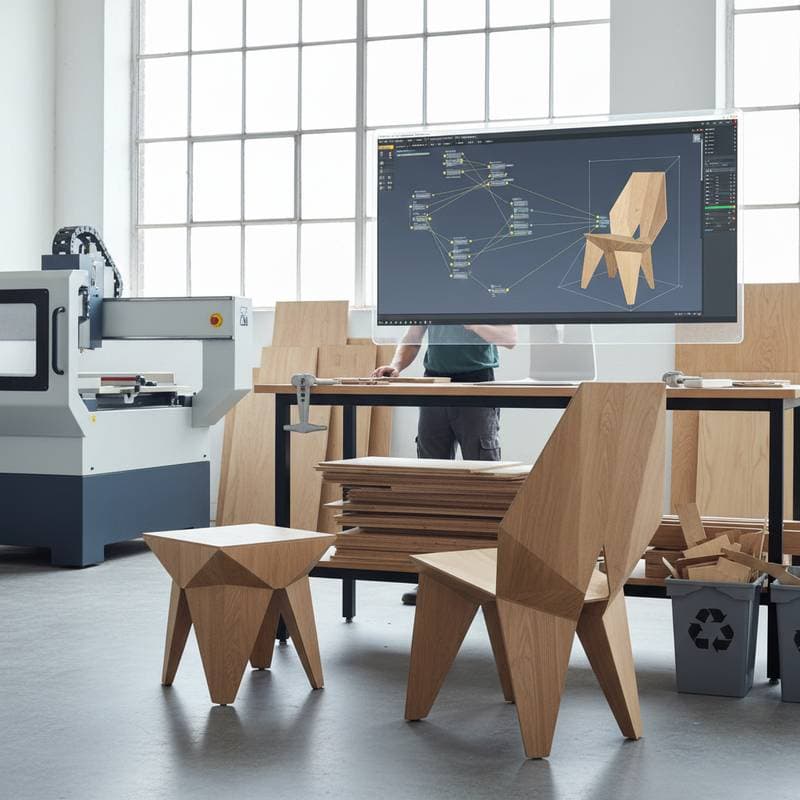
Parametric Tools Revolutionize DIY Custom Furniture
Custom furniture once required hours of hand drafting, trial cuts, and substantial guesswork. Parametric design tools now alter that process. A single digital model adapts to any dimension, material thickness, or joinery type with minimal adjustments. Tasks that previously demanded days of recalculation now occur in minutes. For DIY woodworkers, these tools save time and provide creative freedom typically reserved for industrial design studios.
How Parametric Design Reshapes Custom Furniture
Parametric design involves creating relationships rather than fixed drawings. Instead of a static chair plan, users define rules such as seat height, leg angle, and joinery offsets. The system, often a plug-in within a 3D modeling tool, adjusts all elements when one value changes. Grasshopper for Rhino represents the most recognized example, though similar systems appear in Fusion 360 and SolidWorks.
For furniture makers, this approach eliminates repetitive redrawing for each variation. A dining table model scales from a two-person breakfast nook to a ten-person family table through simple numerical changes. Joints, proportions, and hardware placement shift according to the design logic.
Why it works:
The model relies on parameters rather than static geometry. These parameters govern relationships between parts, ensuring that updates preserve alignment, balance, and fit. After defining the logic, the software performs recalculations immediately.
Action step:
Select a simple project, such as a small side table. Establish height, top thickness, and leg spacing as adjustable parameters. Export multiple versions to observe how changes influence balance and material use.
Costs and Budget for Parametric Furniture Projects
Software constitutes the primary upfront expense. Rhino with the Grasshopper plug-in requires approximately $995 for a perpetual license, whereas Fusion 360 provides free options for hobbyists. Open-source platforms like Blender with Sverchok allow entry at no cost, although the interface may seem less refined.
Typical budget breakdown for a single furniture piece:
- Software: $0 to $995 (one-time)
- Plywood or hardwood: $150 to $600 depending on species and size
- CNC cutting service: $80 to $250 per sheet
- Finishing materials: $40 to $120
- Hardware and fasteners: $25 to $75
A small parametric project, such as a stool, may total under $200 with scrap plywood. A full dining table featuring custom joinery patterns could approach $1,000. Software ownership reduces costs for subsequent pieces, as design expenses remain covered.
Money-saving tip:
Employ digital nesting tools to optimize part arrangement on sheet goods. Most parametric platforms incorporate nesting algorithms that minimize material waste by up to 40 percent.
Where not to cut corners:
Select quality plywood or avoid MDF for designs with precise joinery. Parametric precision yields benefits only when materials maintain tolerances within one millimeter.
Common Mistakes When Using Parametric Design in Woodworking
1. Overcomplicating the model.
New users frequently introduce excessive parameters. Each additional variable heightens the risk of conflicts. Limit initial models to three or four adjustable dimensions.
2. Ignoring material thickness.
Parametric design requires precise inputs. If plywood measures 17.8 millimeters rather than 18, joints may develop small gaps. Measure stock with calipers and adjust variables prior to cutting.
3. Forgetting tool constraints.
CNC routers cannot access inside corners smaller than the bit radius. Parametric designs must account for these physical limitations to avoid poor fits. Incorporate a fillet parameter on inside corners to align with the bit size in use.
4. Skipping version control.
A single erroneous connection can disrupt the model logic. Save iterations with descriptive names, such as Chair_V3_Leg_Adjusted. This practice prevents hours of retracing steps.
5. Not testing a prototype.
Even superior digital models demand physical verification. Cut one leg or joint before processing a full sheet. Fine-tune tolerances to facilitate smoother assembly.
Quick fix:
Approach the initial parametric project as a learning prototype. Record successes, failures, and desired parameter adjustments. Each effort refines logic for future designs.
Living with Your Design
Parametric furniture excels in adaptability. A completed model resizes for various rooms or users without full redesigns. This versatility enhances sustainability, as pieces evolve alongside changing needs.
Many makers create adjustable shelving units that conform to wall widths or stools that modify height for different workbenches. The same principles extend to built-ins, cabinetry, and outdoor furniture.
Practical example:
A parametric bench for a 48-inch hallway extends to 60 inches for a porch while preserving joinery. Seat slats, leg spacing, and screw holes adapt automatically. Such features prolong design utility.
Action step:
Archive final dimension sets for reference. Include file notes on materials and finishes to simplify recreation or modification.
Pro Tips for Success
- Start small. Select a compact project that utilizes one sheet of plywood.
- Use consistent naming. Label parameters explicitly, such as Top_Thickness or Leg_Angle.
- Test scaling. Alter one dimension significantly to verify logic integrity.
- Document formulas. Maintain a brief note file outlining variable interactions.
- Leverage community scripts. Explore open-source Grasshopper files for furniture patterns, joints, and nesting workflows.
Resources and Visual Aids
Explore tutorials on Grasshopper basics through Rhino's official documentation. Fusion 360's learning portal offers free woodworking-specific modules. Community forums like the Grasshopper subreddit provide shared scripts and troubleshooting advice. For visual inspiration, review parametric furniture galleries on design platforms such as Behance.